About Media Recording
In Reading Forest, when you add video credits (Director, Direction, Screenplay, Cast, Channel) or music credits (Lyricist, Composer, Conductor, Singer, Performer), the app automatically switches to media mode.
- Video (Director, Direction, Screenplay, Cast, Channel, Music): "Pages" becomes "Running Time"
- Music (Lyricist, Composer, Conductor, Singer, Performer): "Pages" becomes "Playback Time"
- Time input format is the same for both: M:SS (minutes:seconds) or H:MM:SS (hours:minutes:seconds)
💡 Tip: To record YouTube videos or TV shows, select "Channel" as the credit type and enter the channel name (e.g., BBC, NHK). The app will automatically switch to Running Time mode.
Importing Credits (Movies and Music)
Instead of retyping the director, cast and screenplay, you can look the title up on Wikipedia and Wikidata and put the credits straight into the form. It is the same experience books already have with Google Books and the National Diet Library, now for movies and music.
-
Enter the title
In the work information editor, type the title of the work -
Press [Import credits]
It appears below the credits. It is shown only for movies and music (for books, use the Google Books / National Diet Library import) -
Pick the work
Up to five candidates are offered. Different works share titles, so nothing is chosen automatically, even when there is only one result -
Choose what to add, then import
You see the list before anything is added, and can uncheck what you do not want. If the article's title differs from the one you typed (for example, you typed "Seven" and picked Seven Samurai), the title is listed too, shown next to your current title
Importing only adds rows. A name that is already there is not added again, so nothing is duplicated. Running time is filled in only when the field is empty; a value you already entered is never overwritten. The title changes only when the title is checked in the list.
Besides Wikipedia articles, the candidate list also includes works from Wikidata, the Wikimedia structured database; those carry a Wikidata badge. Fellini's Il bidone (1955), for instance, has no article in the Japanese Wikipedia, yet its director, screenplay, cast and running time can be imported from Wikidata.
Some works are listed on Wikidata under a different heading. The search still finds them by the title you typed and notes the Wikidata heading next to it.
Tick [Exact title match] under the title field and the candidates are narrowed to articles whose title is exactly what you typed (for "La Strada" in Japanese, "道", that is 道 (1954年の映画)). If no article has that exact title, the closest candidates are shown with a note. The same tick also applies to the book information search (🔍).
Movies: director, direction, screenplay, cast, music, production, running time, release year. Music: artist, producer, label, running time, release year. Some works do not list every item.
Most work images on Wikipedia are not freely reusable. We have chosen not to place them in your cover field automatically. Pick images yourself from "Find a poster image", as before.
The sources are Wikipedia (Japanese edition) and Wikidata. Both keep being edited, so what you import is not guaranteed to be current — check the original entry when it matters.
Finding Cover Art (Music)
For music, press […] beside the cover field and choose [Find cover art]. Candidates are shown, and picking one fills the cover field for you — no copying URLs.
-
Enter the title (and the artist, if you can)
An artist in the credits makes it much less likely to pick up a different work with the same title -
Press […] beside the cover field and choose [Find cover art]
This choice appears only for music -
Pick one of the candidates
The same album often has different art across editions and reissues, so you can see them and choose
We could not find a freely usable source that distributes movie posters, so movies keep […] → [Google image search]. Paste the URL of the image you find into the cover field.
Candidates come from Cover Art Archive / MusicBrainz. Some works are not registered there.
Recording a Movie — Casablanca Example
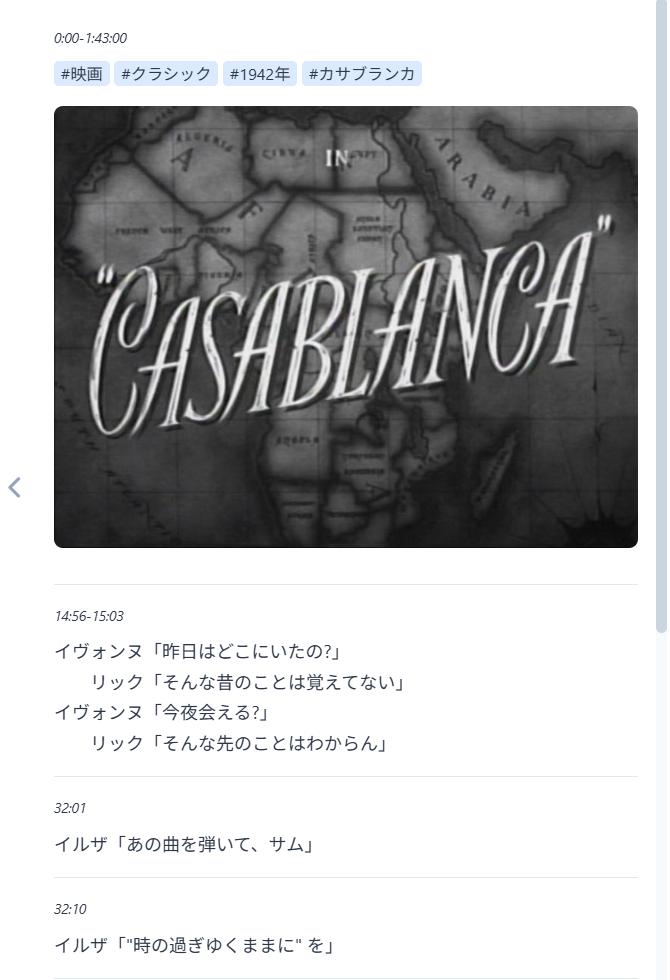
Here we'll use the 1942 classic film "Casablanca" as an example to show how to add a movie to your reading log.
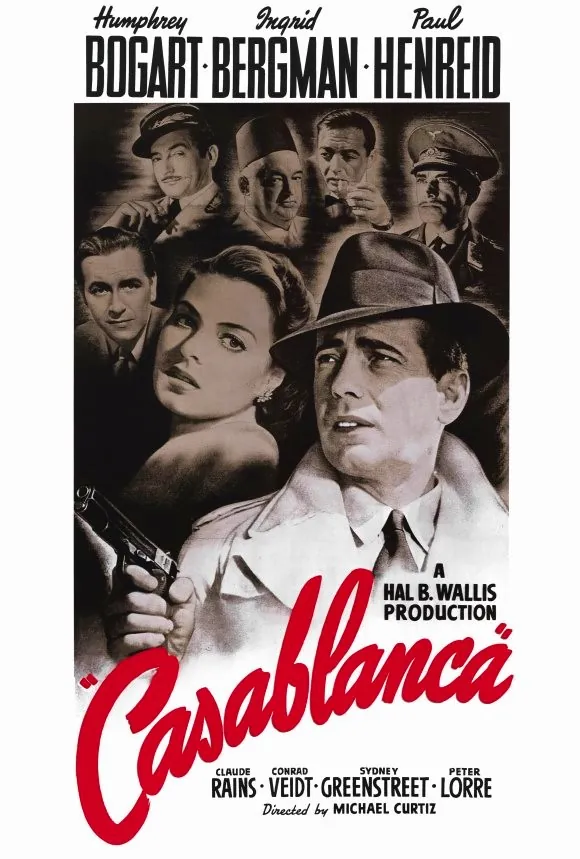
Source: Wikimedia Commons (Public Domain)
| Title | Casablanca |
|---|---|
| Runtime | 103 min |
| Director | Michael Curtiz |
| Cast | Humphrey Bogart |
| Cast | Ingrid Bergman |
| Screenplay | Julius J. Epstein |
| Screenplay | Philip G. Epstein |
| Screenplay | Howard Koch |
| Production | Warner Bros. |
Step 1: Add a Movie to Your Reading Log
A. First launch / New reading log
When you open Reading Forest, an empty reading log and entry form are displayed automatically. To create a second or subsequent reading log, click [File] → [New].
- The "New Reading Log" text shown at the top left is the filename. Click it to rename (e.g., "Movie Log")
- Enter "Casablanca" in the title field
* Reading Forest was originally developed as a reading tracker, so the file is still called a "reading log." For movies or music, we recommend renaming it to "Movie Log" or "Music Log" for easier organization.
B. Adding to an existing reading log
- Open your reading log
- Click the [Add Book] button on the toolbar, or select [Edit] → [Add Book] from the menu (shortcut Alt+N)
- Enter "Casablanca" in the title field
Step 2: Add Credit Information (Optional)
The title alone is enough to create an entry, but adding director and cast names makes it easier to find later by search. If you want to skip this, go to Step 3.
- Click the default credit type "Author" and change it to "Director" from the dropdown, then enter "Michael Curtiz"
- Click the [+] button to add a row, select "Cast", and enter "Humphrey Bogart"
- Add more cast members, screenwriters, or production companies as needed
When you add any of the video credits (Director, Direction, Screenplay, Cast, Channel, or Music), Reading Forest automatically recognizes the entry as a video. The "Pages" label changes to "Running Time" and the record input format switches to time-based.
Step 3: Set the Runtime (Optional)
You can skip this if you watch the entire film in one sitting. Setting the runtime is useful when you split viewing across multiple sessions, as it displays your viewing progress.
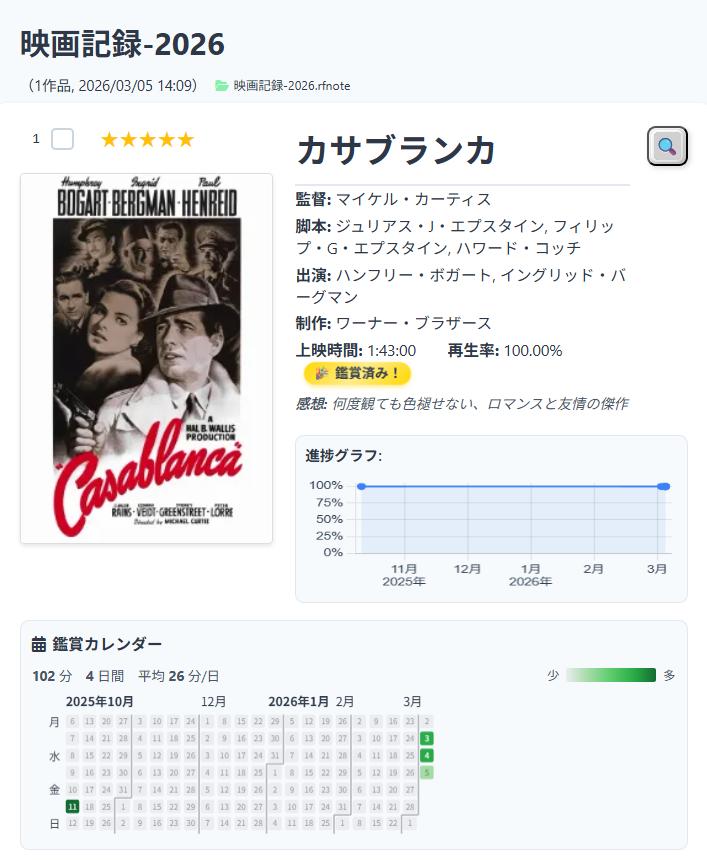
- Enter 103 (plain minutes) in the runtime field. You can also use 103:00 (M:SS) or 1:43:00 (H:MM:SS)
- You can also set a poster or still image as the cover. Click the button next to the cover field to select a file
- Click [OK] to add the entry
For cover and memo images, simply specifying a URL may result in broken links or server refusals later. It is safer to save the image locally first and then open the local file.
Step 4: Add a Viewing Record
To log when you watched the movie, use the same record-adding process. However, instead of page ranges, you enter time ranges.
- Click the [Add Record] button
- Select the date
- Enter the time range (e.g., 0:00:00-1:43:00)
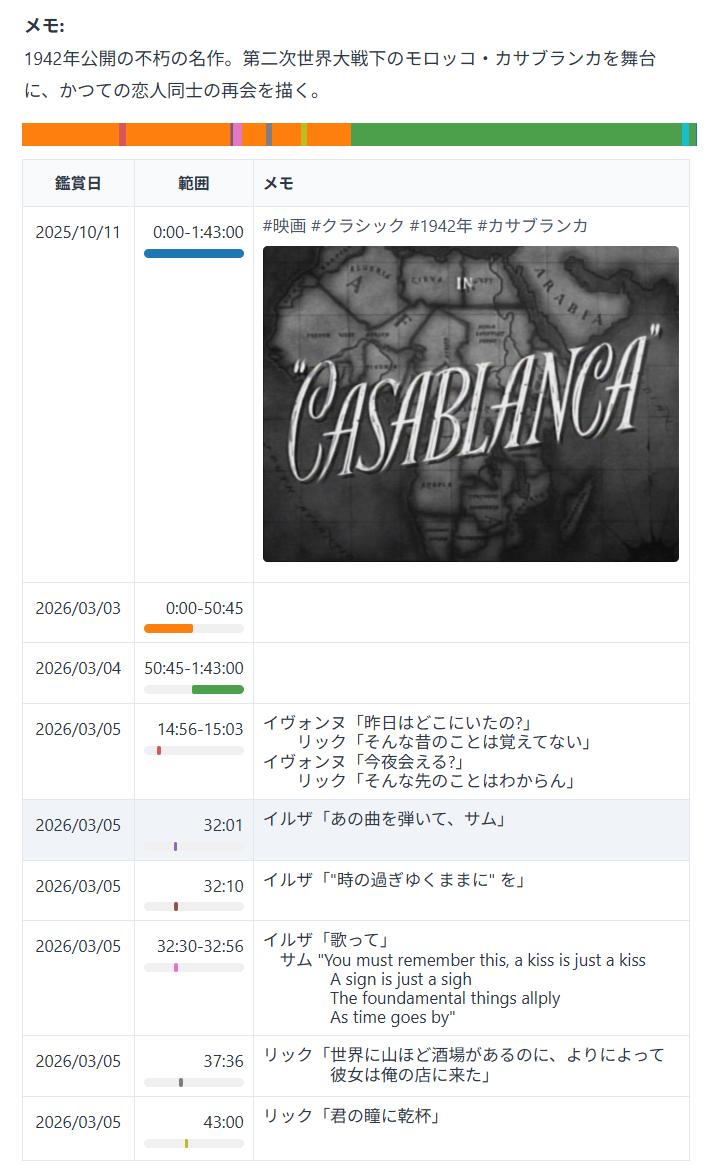
- Optionally write your thoughts or notes in the memo field (you can leave it blank). You can also insert images
- Click [OK] to save the record
Time is entered in M:SS (minutes:seconds) or H:MM:SS (hours:minutes:seconds) format. A plain number is interpreted as minutes (e.g., 103 = 103:00 = 1:43:00).
- Watched the entire film: 0:00-103:00 (or 0:00:00-1:43:00)
- Watched partway: 0:00-50:00
- Continued from where you left off: 50:00-103:00
Main Screen Example
Here is how the Casablanca entry and viewing records look on the main screen.
Reading Mode Example
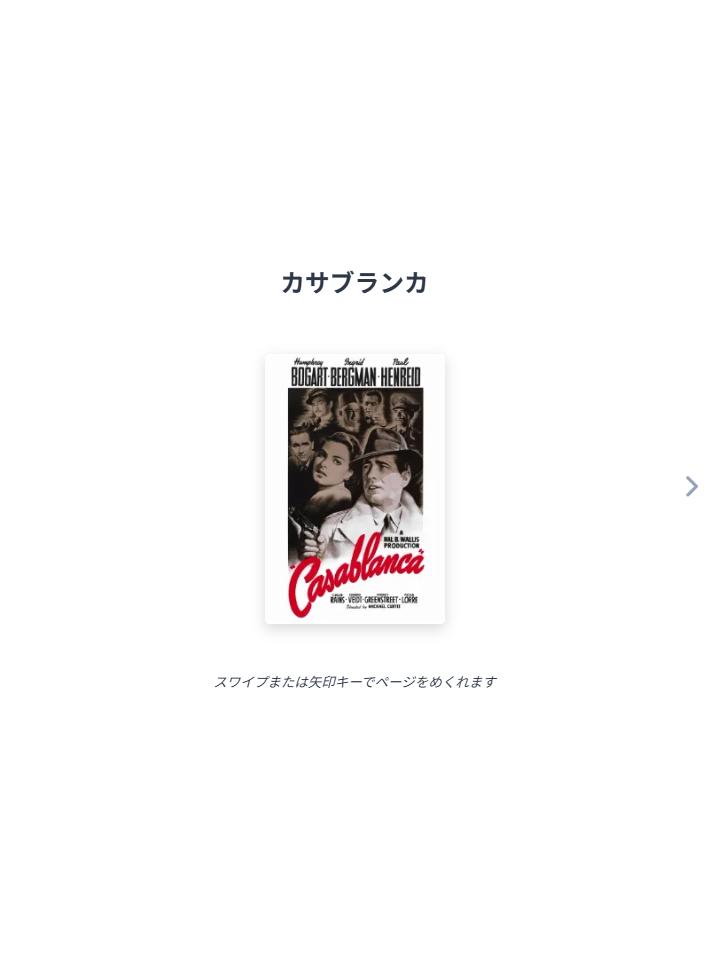
Opening the same records in Reading Mode ([View] → [Reading Mode]) lets you browse excerpts and notes page by page.
Recording Music — Für Elise Example
Here we'll use Beethoven's famous piece "Für Elise" as an example to show how to add music to your reading log.
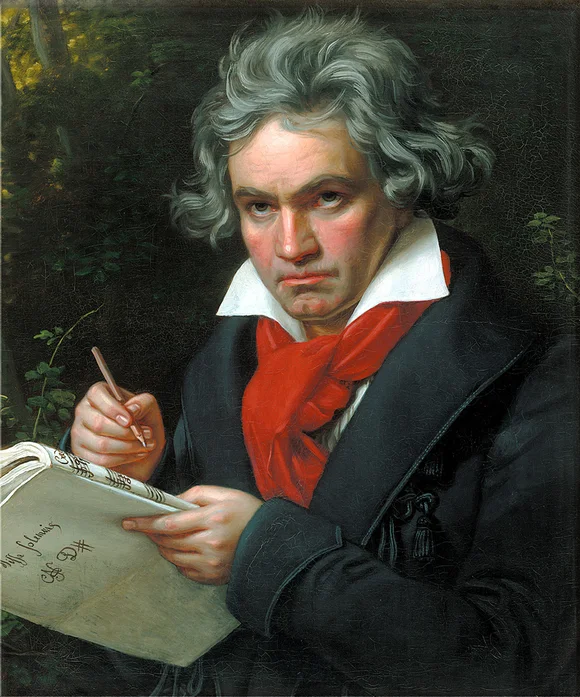
Source: Wikimedia Commons (Public Domain)
Joseph Karl Stieler (1820)
| Title | Für Elise |
|---|---|
| Playback Time | 3:00 |
| Composer | Ludwig van Beethoven |
| Performer | Vladimir Ashkenazy |
Step 1: Add a Track to Your Reading Log
A. First launch / New reading log
When you open Reading Forest, an empty reading log and entry form are displayed automatically. To create a second or subsequent reading log, click [File] → [New].
- The "New Reading Log" text shown at the top left is the filename. Click it to rename (e.g., "Music Log")
- Enter "Für Elise" in the title field
* Reading Forest was originally developed as a reading tracker, so the file is still called a "reading log." For movies or music, we recommend renaming it to "Movie Log" or "Music Log" for easier organization.
B. Adding to an existing reading log
- Open your reading log
- Click the [Add Book] button on the toolbar, or select [Edit] → [Add Book] from the menu (shortcut Alt+N)
- Enter "Für Elise" in the title field
Step 2: Add Credit Information (Optional)
The title alone is enough to create an entry, but adding lyricist, composer, and singer names makes it easier to find later by search. If you want to skip this, go to Step 3.
- Click the default credit type "Author" and change it to "Composer" from the dropdown, then enter "Beethoven"
- You can also click the [+] button to add "Performer" or other credits as needed
When you add any of the music credits (Lyricist, Composer, Conductor, Singer, or Performer), Reading Forest automatically recognizes the entry as music. The "Pages" label changes to "Playback Time" and the record input format switches to time-based.
Step 3: Set the Playback Time (Optional)
You can skip this if you listen to the entire piece in one sitting. Setting the playback time is useful when you split listening across multiple sessions, as it displays your listening progress.
- Enter 3:00 (3 minutes 0 seconds) in the playback time field
- You can also set a jacket image or artist photo as the cover. Click the button next to the cover field to select a file
- Click [OK] to add the entry
For cover and memo images, simply specifying a URL may result in broken links or server refusals later. It is safer to save the image locally first and then open the local file.
Step 4: Add a Listening Record
To log when you listened to the music, use the same record-adding process. However, instead of page ranges, you enter time ranges.
- Click the [Add Record] button
- Select the date
- Enter the time range (e.g., 0:00-3:00)
- Optionally write your thoughts or notes in the memo field (you can leave it blank). You can also insert images
- Click [OK] to save the record
A plain number is interpreted as minutes, the two-part form as minutes:seconds (M:SS), and the three-part form as hours:minutes:seconds (H:MM:SS).
- 103 → 103 minutes (handy for movie runtimes)
- 4:33 → 4 minutes 33 seconds (handy for track lengths)
- 1:43:00 → 1 hour 42 minutes 0 seconds
⚠️ 2:04 means "2 minutes 4 seconds". For 2 hours 4 minutes, enter 2:04:00.
Recording by Album
- Enter the album name as the title and add it
- Add "Composer" and/or "Performer" credits. "Pages" will change to "Playback Time"
- Enter the total album length in the playback time field (e.g., 45:00 for a 45-minute album)
- Record your impressions of individual tracks in the memo field
Compilation Albums (Various Artists)
For compilation albums featuring multiple artists, add the main artists as credits.
- Enter the album name as the title
- Add a few key artists as "Singer" or "Performer" credits (you don't need to list everyone)
- Optionally add "Production" for the record label
- Enter the total album length in the playback time field
- Individual track artists and impressions can be noted in each record's memo
"Production" alone does not activate music mode. You must add at least one of "Lyricist", "Composer", "Conductor", "Singer", or "Performer".
Recording by Track
If you prefer to record each song individually, create a separate entry for each track.
- Enter the song title
- Add "Composer," "Singer," and/or "Performer" credits
- Enter the track length in the playback time field (e.g., 4:33 = 4 minutes 33 seconds)
For songs, try copying the lyrics into the record's memo field so you can revisit them anytime. You can also jot down just your favorite phrases or lines.
Record time ranges are also entered in the same format (e.g., 45 = 45:00).
- Listened to the full album: 0:00-45:00
- Listened to the first three tracks: 0:00-12:30
- Continued from where you left off: 12:30-45:00
The same method works for podcasts and radio programs. Keep all your media consumption organized in one place.
Credit Types Reference
Here is a complete list of credit types available in Reading Forest.
| Type | Purpose | Example |
|---|---|---|
| Author | Book author | Haruki Murakami |
| Supervisor | Academic supervisor | Textbook supervisors |
| Translator | Translator | Book translators |
| Publisher | Publisher or organization | Penguin Books |
| Director | Film director | Michael Curtiz |
| Direction | TV drama / stage direction | TV drama directors |
| Screenplay | Screenwriter | Julius J. Epstein |
| Cast | Actors / performers | Humphrey Bogart |
| Channel | Streaming channel / show | YouTube channel name |
| Music | Film / TV score composer | Max Steiner |
| Lyricist | Lyricist | Bernie Taupin |
| Composer | Composer | Beethoven |
| Conductor | Conductor | Herbert von Karajan |
| Singer | Singer / vocalist | Adele, Taylor Swift |
| Performer | Performer / ensemble | Vienna Philharmonic |
| Production | Production company / record label | Toho, Sony Music |
| Custom | For anything not listed above | Enter a custom type name |
Reading Forest switches to media mode based on the credit types you add:
- Video mode (label changes to Running Time): Director, Direction, Screenplay, Cast, Channel, or Music
- Music mode (label changes to Playback Time): Lyricist, Composer, Conductor, Singer, or Performer
Catalog Display for Movies and Music Paid Plan Only
When you open the Catalog window ([View] → [Catalog]) for a reading log that contains only movies or only music, the display labels automatically switch to match the content type.
The Catalog window is a paid-plan feature. On the free plan the main screen switches labels in the same way.
Movies Only
When all entries are video works, the entire Catalog switches to movie-oriented labels.
- Stats labels: "Registered Books" → "Registered Works", "Read / Total Pages" → "Watched / Total Runtime"
- Column headers: "Cover" → "Poster", "Author" → "Director", "Total Pages" → "Runtime", "Progress" → "View Rate", "Last Read" → "Last Viewed"
- Graph: "Reading Volume" → "Viewing Time" (unit: h:mm)
- Calendar: "Reading Calendar" → "Viewing Calendar"
Music Only
When all entries are music works, the entire Catalog switches to music-oriented labels.
- Stats labels: "Registered Books" → "Registered Works", "Read / Total Pages" → "Played / Total Playback Time"
- Column headers: "Cover" → "Artwork", "Author" → "Artist", "Total Pages" → "Duration", "Progress" → "Play Rate", "Last Read" → "Last Played"
- Graph: "Reading Volume" → "Playback Time" (unit: minutes)
- Calendar: "Reading Calendar" → "Playback Calendar"
Movie-oriented labels appear when all entries in the reading log are video works. Music-oriented labels appear when all entries are music works. If the log contains a mix of books and media, the default book labels are used. See Catalog & Sorting — Display for Movie & Music Files for more details.
Searching for Movies & Music
When you log a work you have already watched or listened to, what you usually need is the director, screenplay and cast (or the lyricist, composer and performers) plus the poster or cover art. That is why "Credits & details" comes first among the search sites. Purchase, streaming, rental, used/secondhand and review sites follow after it.
How to Search
The easiest way is to click the magnifying glass icon next to the title of the work you want to search. You can also use [Edit] → [Database Search], which searches the currently selected or editing work (or the first work if none is selected).
Adding a credit such as "Director" or "Singer" marks the work as a movie or as music, and the search opens the matching sites. Even if you have not added any credit yet, a work is searched as a movie (or as music) when most of the works in that reading log are movies (or music) — the title alone is enough. In a reading log that is mostly books, the search stays a book search as before.
- Click "Find This Movie" (or "Find This Music")
- Choose from the categorized search sites (Credits & details, Purchase, Streaming, Rental, Used/Secondhand, Reviews)
- Copy the director, cast and so on from the page you opened, and paste them into the credit fields
- Movie & drama details: Wikipedia, eiga.com, TMDb, IMDb, "Find poster images"
- Music details: Wikipedia, Discogs, MusicBrainz, "Find cover art"
- Watch / buy: Amazon, Prime Video, U-NEXT, Netflix, TSUTAYA DISCAS, GEO, Filmarks, etc.
- Listen / buy: Amazon, Spotify, Apple Music, YouTube Music, TSUTAYA DISCAS, GEO, etc.
The image search behind the button next to the cover field also adapts to the work type: "title + director + movie poster" for movies, "title + artist + album cover" for music, and "title + author + book cover" for books as before.
For books, the menu shows Amazon, Google Books, National Diet Library, Calil, etc. For movies and music, these are replaced with streaming services, rental stores, and review sites. The errata and translation searches are hidden for media entries.
Frequently Asked Questions
Q: Can I search for movies by ISBN?
ISBN search is a book-specific feature. Movie and album information must be entered manually. However, you can search streaming services, rental stores, and review sites from the database search menu.
Q: Can I change an existing book entry to a movie?
Yes. Edit the work information and add any video credit (Director, Direction, Screenplay, Cast, Channel, or Music). The app will automatically switch to video mode. For music, add Lyricist, Composer, Conductor, Singer, or Performer.
Q: Can I record TV dramas or anime series?
Yes. Add a "Direction" credit to have it recognized as a drama. You can either create a single entry for the entire series with total runtime, or create individual entries for each episode. Choose whichever approach suits you best.
Q: Is the time input format the same for movies and music?
Yes. The two-part form (e.g., 5:30) is interpreted as minutes:seconds (M:SS), and the three-part form (e.g., 1:30:00) as hours:minutes:seconds (H:MM:SS). You can also enter the runtime as plain minutes (e.g., 103).
Q: What is the difference between the "Music" and "Composer" credit types?
The "Music" credit is for film/TV score composers (the person who writes the soundtrack) and triggers video mode (label changes to Running Time). The "Composer" credit is for composers of standalone music works and triggers music mode (label changes to Playback Time). The time input format is the same for both.