Color Spaces
What Is a Color Space?
A color space is a coordinate system for representing colors numerically. Different color spaces are chosen depending on the application.
RGB Color Space
The RGB color space represents colors by additive mixing of three primary colors: Red, Green, and Blue. To treat it as a concrete color space, one specifies a standard such as sRGB that fixes the primaries, white point, and gamma (the same RGB values denote different colors under different standards).
RGB Cube
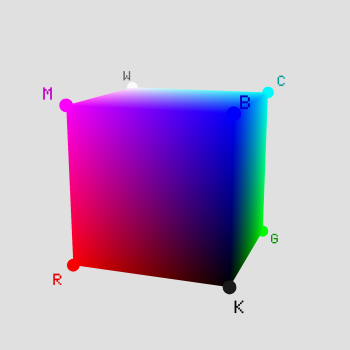
Additive Mixing
R, G, B ∈ [0, 255] (8-bit) Total colors: 256³ ≈ 16.77 million
Light Primaries vs. Pigment Primaries
There are two fundamentally different ways to mix colors.
| Property | Additive (Light Primaries) | Subtractive (Pigment Primaries) |
|---|---|---|
| Primaries | R (Red), G (Green), B (Blue) | C (Cyan), M (Magenta), Y (Yellow) |
| Mixing result | Gets brighter (all mixed → white) | Gets darker (all mixed → theoretically black) |
| Principle | Adding light (emission) | Absorbing light (subtracting from reflected light) |
| Applications | Displays, lighting, cameras | Printing (CMYK), paint |
| Relationship | C = G+B (remove red), M = R+B (remove green), Y = R+G (remove blue) In values normalized to 0–1: C = 1−R, M = 1−G, Y = 1−B Additive and subtractive primaries are complementary |
|
In printing, CMY alone cannot produce true black, so black ink (K: Key) is added, giving CMYK. Computer vision primarily uses additive RGB.
Note: OpenCV's cv2.imread returns images in BGR order. Convert with COLOR_BGR2RGB before passing them to anything that assumes RGB order (such as display with matplotlib).
HSV/HSL Color Space
HSV (Hue, Saturation, Value) separates a color into hue, saturation, and value, which makes it intuitive to work with and well-suited for color selection and simple threshold-based extraction. It is not perceptually uniform, however (pure blue and white both have $V = 1$). HSL, also in the heading, is a variant that uses the average of the maximum and minimum, $L = (M + m)/2$ ($M, m$ are the maximum and minimum of R, G, B; the same quantity as the lightness method below), instead of the value $V$, and its saturation is defined differently.
HSV Components
- H (Hue): The type of color, as an angle from 0° up to (but not including) 360° (red=0°, green=120°, blue=240°; undefined for achromatic colors)
- S (Saturation): Color vividness. 0–1 (0=gray, 1=pure color)
- V (Value): Brightness. 0–1 (0=black, 1=maximum brightness)
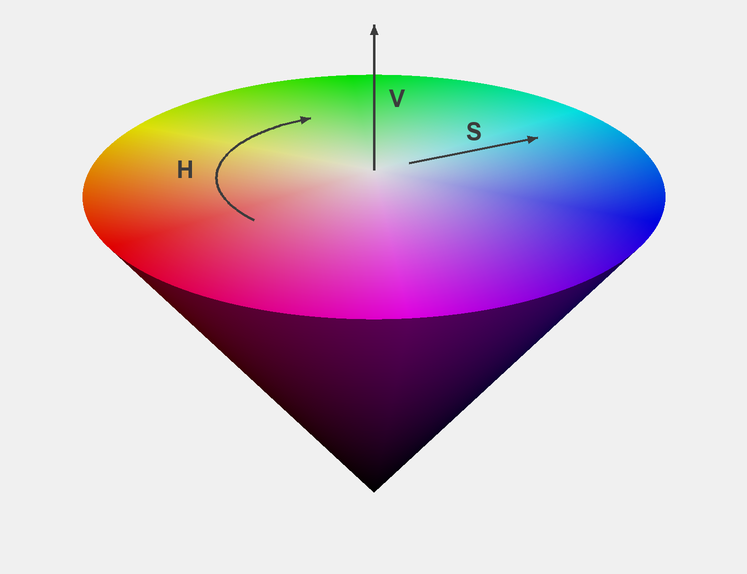
RGB → HSV Conversion (here R, G, B are normalized to 0–1; for 8 bits, divide by 255)
$$M = \max(R, G, B), \quad m = \min(R, G, B), \quad C = M - m$$ $$V = M, \quad S = \begin{cases} C/M & (M \neq 0) \\ 0 & (M = 0) \end{cases}$$ $$H = 60° \times \begin{cases} (G-B)/C \bmod 6 & \text{if } M=R \\ (B-R)/C + 2 & \text{if } M=G \\ (R-G)/C + 4 & \text{if } M=B \end{cases}$$When $C = 0$ (achromatic colors), $H$ is undefined (implementations often set it to 0).
Applications: Color-based object detection, skin detection, background subtraction, etc. For example, simple red detection restricts H to 0°–10° or 350°–360° and also sets lower bounds on S and V (adjust the ranges to the lighting and camera).
OpenCV-specific note: In OpenCV, Hue ranges from 0 to 179 (360° halved to fit in 8 bits), while Saturation and Value range from 0 to 255. When converting from the formulas above, divide H by 2 (the 0°–10° above becomes 0–5 and 350°–360° becomes 175–179) and multiply S and V (0–1) by 255.
YUV / YCbCr Color Space
These color spaces separate a brightness signal Y (strictly speaking luma, not luminance) from chrominance. Since human vision is more sensitive to luminance than to color differences, the chrominance channels can be subsampled to reduce data size.
Difference Between YUV and YCbCr
| Property | YUV | YCbCr |
|---|---|---|
| Origin | Analog TV (PAL; NTSC used the related YIQ) | Digital video standards |
| Value range | Continuous (analog signal) | Quantized to integers (for 8 bits, full range 0–255 or the studio range 16–235 / 16–240 of video standards; 10 bits and more also exist) |
| Applications | Analog broadcast, video signals | JPEG, H.264, MPEG, HDMI |
| Coefficients | Vary by standard (BT.601: SD, BT.709: HD, BT.2020: 4K/8K) | |
YUV and YCbCr are often conflated in literature and libraries, but
OpenCV's COLOR_BGR2YUV and COLOR_BGR2YCrCb perform different conversions.
Modern computer vision primarily uses YCbCr (the digital variant).
RGB → YCbCr Conversion (BT.601 coefficients, full range 0–255, as in JPEG/JFIF)
$$\begin{pmatrix} Y \\ C_b \\ C_r \end{pmatrix} = \begin{pmatrix} 0.299 & 0.587 & 0.114 \\ -0.169 & -0.331 & 0.500 \\ 0.500 & -0.419 & -0.081 \end{pmatrix} \begin{pmatrix} R \\ G \\ B \end{pmatrix} + \begin{pmatrix} 0 \\ 128 \\ 128 \end{pmatrix}$$YCbCr value range: Video standards typically use "studio swing" ranges: Y from 16 to 235, Cb/Cr from 16 to 240.
However, OpenCV's cvtColor uses full range (0–255), like the matrix above. Also, COLOR_BGR2YCrCb returns the channels in the order $Y, C_r, C_b$ (as the name says; $C_b$ and $C_r$ are swapped relative to the matrix above).
Lab Color Space (CIELAB)
Lab is a color space designed so that color differences are roughly proportional to perceived differences (approximately perceptually uniform). Euclidean distance in Lab roughly corresponds to perceived color difference, making it widely used for color difference evaluation and color management. It is not perfectly uniform, however, and the agreement varies across regions of color space.
Lab Components
- L: Lightness (0=black, 100=white)
- a: Green (−) to Red (+) axis
- b: Blue (−) to Yellow (+) axis
RGB → Lab Conversion Pipeline
RGB → XYZ (device-independent intermediate) → Lab. sRGB values must first have their gamma removed (converted back to linear values) before conversion to XYZ. The white point is usually D65.
The XYZ-to-Lab conversion uses a nonlinear function:
$$L^* = 116\,f\!\left(\frac{Y}{Y_n}\right) - 16, \quad a^* = 500\left[f\!\left(\frac{X}{X_n}\right) - f\!\left(\frac{Y}{Y_n}\right)\right], \quad b^* = 200\left[f\!\left(\frac{Y}{Y_n}\right) - f\!\left(\frac{Z}{Z_n}\right)\right]$$where $f(t) = t^{1/3}$ (when $t > \delta^3$), $f(t) = \dfrac{t}{3\delta^2} + \dfrac{4}{29}$ (when $t \le \delta^3$), $\delta = 6/29$. The two branches join at $t = \delta^3$ with matching value and slope. $X_n, Y_n, Z_n$ are the tristimulus values of the white point.
Applications: Color difference calculation ($\Delta E$), color calibration, image segmentation. $\Delta E = \sqrt{(\Delta L^*)^2 + (\Delta a^*)^2 + (\Delta b^*)^2}$ serves as a simple perceptual color difference metric (the CIE76 color difference); CIE94 and CIEDE2000 ($\Delta E_{00}$) are used as metrics that agree better with perception.
Grayscale Conversion
There are several methods to convert a color image to grayscale (a single channel corresponding to brightness). Since the meaning of the value depends on the method, we write the result of the luminosity method as $Y$ and that of the other methods as $I$:
Luminosity Method — most common
$$Y = 0.299R + 0.587G + 0.114B$$BT.601 weights based on human eye sensitivity (most sensitive to green, least to blue). The formula is applied directly to gamma-corrected values, so strictly speaking the result is not physical luminance but a quantity called “luma”. BT.709 (HD, sRGB) uses 0.2126, 0.7152, 0.0722 on linear values. OpenCV's COLOR_BGR2GRAY uses these BT.601 weights.
Average Method
$$I = \frac{R + G + B}{3}$$Lightness Method
$$I = \frac{\max(R,G,B) + \min(R,G,B)}{2}$$Code Example (Python)
import cv2
import numpy as np

# Read image (BGR)
img_bgr = cv2.imread('image.jpg')

# Color space conversions
img_rgb = cv2.cvtColor(img_bgr, cv2.COLOR_BGR2RGB)
img_hsv = cv2.cvtColor(img_bgr, cv2.COLOR_BGR2HSV)
img_ycrcb = cv2.cvtColor(img_bgr, cv2.COLOR_BGR2YCrCb)  # channel order: Y, Cr, Cb
img_gray = cv2.cvtColor(img_bgr, cv2.COLOR_BGR2GRAY)
img_lab = cv2.cvtColor(img_bgr, cv2.COLOR_BGR2LAB)  # 8-bit: stores L*×255/100 and a*, b* offset by 128

# Extract a specific color using HSV (e.g., red; OpenCV's H is 0–179, so 0°–10° → 0–5 and 350°–360° → 175–179)
mask1 = cv2.inRange(img_hsv, np.array([0, 100, 100]), np.array([5, 255, 255]))
mask2 = cv2.inRange(img_hsv, np.array([175, 100, 100]), np.array([179, 255, 255]))
mask = cv2.bitwise_or(mask1, mask2)
result = cv2.bitwise_and(img_bgr, img_bgr, mask=mask)

# Manual grayscale calculation (luminosity method, BT.601 weights; round to match cv2)
b, g, r = cv2.split(img_bgr)
gray_manual = np.round(0.299 * r + 0.587 * g + 0.114 * b).astype(np.uint8)
Frequently Asked Questions
Q1. What is the difference between RGB and HSV color spaces?
RGB represents colors by additive mixing of the red, green, and blue primaries of light and is used for display output. HSV separates a color into hue (H), saturation (S), and value (V), which makes it intuitive and well suited to simple threshold-based color extraction and object detection. HSV is not perceptually uniform, however.
Q2. What is the difference between YUV and YCbCr?
YUV originally refers to the color-difference signals of analog television (PAL; NTSC used the related YIQ), while YCbCr is the integer-quantized color-difference representation used in digital images and video such as JPEG and H.264. Libraries sometimes use the term YUV loosely to include YCbCr, but OpenCV's COLOR_BGR2YUV and COLOR_BGR2YCrCb are different conversions. Modern computer vision primarily uses YCbCr.
Q3. What is the most common grayscale conversion method?
The luminosity method $Y = 0.299R + 0.587G + 0.114B$ is the most common. Its BT.601 weights reflect the eye being most sensitive to green and least to blue, and OpenCV's COLOR_BGR2GRAY uses them as well. Because it is applied to gamma-corrected values, strictly speaking the result is luma rather than physical luminance.
Summary
- RGB: The standard for display, based on additive mixing
- HSV/HSL: Intuitive separation into hue, saturation, and value; well suited to color extraction
- YUV/YCbCr: Separates luma from chroma, used in video compression
- Lab: Approximately perceptually uniform, suited to color difference and color management
- Grayscale: A single channel corresponding to brightness (its meaning depends on the conversion method), widely used as preprocessing for image analysis